

Why I Tried Heidi Remote
I have been using the Heidi platform for a while now, and it genuinely changed how I approach clinical documentation. But one thing still bothered me: managing my phone during consultations.
Balancing a device on the desk, hoping it stayed in range, checking that the recording had not stopped midway through a session. It was a minor friction, but it added up across a full day of patients.
When Heidi announced the Remote, a clip-on microphone built specifically for clinical use, I was curious enough to try it. I wanted to know whether it would actually remove that friction or just add another device to manage.

First Impressions
The packaging is clean and minimal. Nothing excessive, which felt right for a clinical tool rather than a consumer gadget.
The device itself is compact and well-made. It is a small capsule-shaped clip-on mic that does not feel cheap or fragile in the hand.
What struck me immediately was how unobtrusive it looks when worn. It clips discreetly onto a coat lapel or chest pocket and does not draw attention during a consult, which matters when you are trying to keep the focus on the patient.
Setup Process
Getting started was straightforward. I paired the device with my phone once through the Heidi app, and that was essentially it.
The whole pairing process took a few minutes. There were no complicated steps, no technical configuration, and no troubleshooting required on my end.
From that point forward, the setup each morning is simply clipping the device on and pressing a button to start recording. That is genuinely all it takes.
Day-to-Day Use of Heidi Remote
The first thing about Heidi Remote I noticed in daily use was how quickly it became invisible in my routine. I stopped thinking about the recording process entirely, which is exactly the point.
I wear it from my first consultation of the morning through to the last appointment of the day. The battery has not let me down mid-session, which was one of my concerns before I started using it.
The offline recording feature came in more useful than I expected. On days when connectivity is patchy, the device captures everything locally and syncs automatically when the connection returns. I do not have to think about it.

The LED indicator has also been more useful than I initially expected. It gives me a quick visual confirmation that recording is active without having to check my phone, and it signals to patients that the session is being captured, which supports transparency.
Patients have not reacted negatively to it. If anything, the clip-on format feels less intrusive than a phone sitting on the desk between us.
Heidi Remote Performance
Audio quality has been consistently good across different environments. Consultation rooms, corridors, and even noisier spaces have all produced transcriptions that I would describe as accurate.
There were a handful of moments where background noise was heavier than usual, and the transcription still held up well. The Heidi platform handles the processing side effectively when it is given clean input, and the Remote does a reliable job of providing that.
[IMAGE SUGGESTION: Screenshot of a completed Heidi AI clinical note generated from a Heidi Remote recording, showing a structured patient consultation summary] Alt text: Heidi platform showing an AI-generated clinical consultation note produced from a Heidi Remote recording, including structured patient history and plan
The connection between the device and my phone has been stable. I have not experienced dropouts or sync failures during normal use. Recordings have appeared in the Heidi platform ready for review without any manual steps on my end.
One thing worth mentioning: the device connects only to the paired device, which from a privacy standpoint is reassuring. It is not broadcasting to anything else in the room.
Heidi Remote Time Savings
The time savings are real, and they are more significant than I expected before I started tracking them.
Before the Remote, I was spending time between patients checking recordings, repositioning my phone, and occasionally re-dictating details that had not been captured clearly. Small tasks individually, but they accumulate.
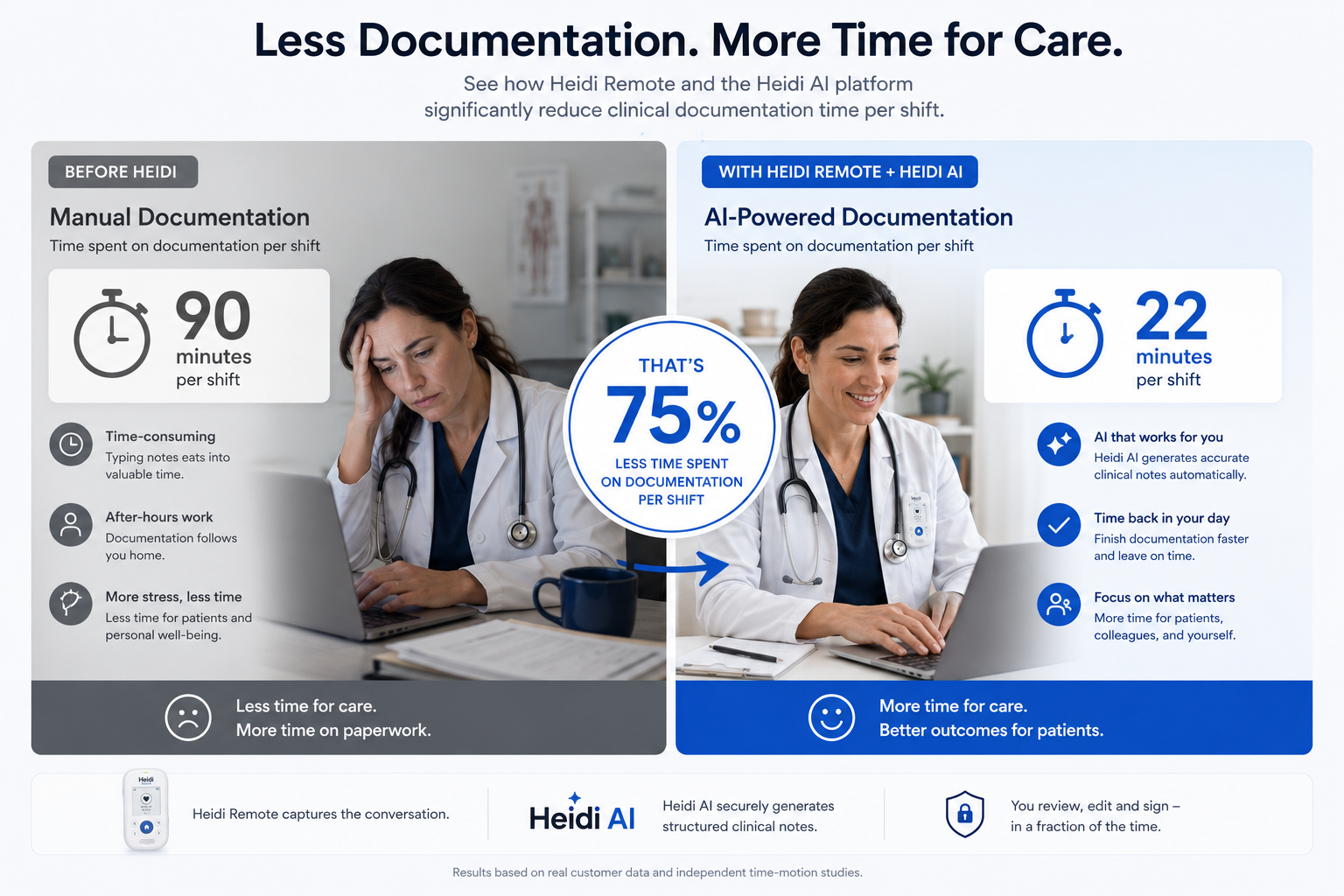
With the Remote handling capture and the Heidi platform handling documentation, my post-consult admin has shortened noticeably. I am reviewing and approving notes rather than writing them from scratch, which is a fundamentally different task.
Across a week, the hours recovered add up to time I am putting back into patient care, continuing education, or simply finishing the day at a reasonable time.
What I Liked
The setup is genuinely as simple as advertised. Pair once and you are done.
The battery covers a full day without issue. I have not needed to charge it mid-shift.
The offline recording works reliably. It is not a workaround or a fallback, it is a fully functioning feature.
The LED indicator is a small detail that earns its place. It removes uncertainty about recording status at a glance.
The device is comfortable to wear all day. It is light enough that I forget it is there, which is the best thing you can say about a wearable clinical tool.
Audio quality has been consistent across the different environments I work in. The transcription output from the Heidi platform reflects that consistency.
Features I Want to See
My experience with the Heidi Remote has been largely positive, but there are a few areas where I hope to see the product evolve.
The current device compatibility is focused on iOS. Expanding full support to Android devices and desktop platforms would make the Remote accessible to a much wider range of clinicians, many of whom work across Windows or Android environments in hospital and practice settings.
The clip-on format works well, but not every clinical situation is ideal for it. A wristband option, for example, would be a practical alternative for surgeons, proceduralists, or clinicians who move frequently and need their hands completely free.
Additional color options would also be a welcome addition. The current design is clean and professional, but the ability to choose between white, black, or other neutral tones would help clinicians match the device to their workplace environment or personal preference.
Broader wearable form factors and color choices would not change what the device does, but they would make it easier to recommend to a wider range of colleagues without hesitation.
Overall
Heidi Remote does what it promises. It removes the last point of friction in the clinical recording workflow and lets the Heidi platform do its job with better, more consistent audio input.
For clinicians already on the Heidi platform, the upgrade is straightforward to justify. The time savings are real, the setup is genuinely simple, and the privacy architecture is solid.
At an introductory price of US$224.99 (down from the standard US$299.99), it is not an impulse purchase. But for any clinician who is serious about documentation efficiency, it is a worthwhile investment.
The features I want to see, broader device compatibility across Android and desktop, more wearable form factors, and additional color options, are things I hope Heidi addresses in future versions. They are not dealbreakers, but they would make an already good product significantly more versatile.
If you are a Heidi user who is still relying on your phone for recording, I would encourage you to try the Remote. It is a small change in hardware that creates a noticeable change in how a clinical day feels.
